Release Notes 2026
September 2026
August 2026
July Release 2026
June Release 2026
May 2026
April 2026
March 2026
February 2026
Frequently Asked Questions!
How do I access field level help?
How do I see descriptions of codes in enquiry screens?
How do I make a user have read only access
Can I copy and delete lines in data entry screens?
Out of Office
Can I run a report to view security groups against my users?
How do I stop a user posting to prior and future periods?
Delete a payment run
Changing security access to a user
User setup requires multiple screens and is complicated!
De-allocate an AP Payment
How to stop over receipting of orders
Why has my transaction not appeared on the AP Payment run?
Download Templates
Useful information to include when raising Financials cases
Prevent users posting to specific balance classes
Hints and Tips!
General Ledger - Helpful how-to guides
General Ledger Data Entry
Journal Upload
Journal Entry, Copy and Authorise
Multi Level Authorisation
Modernisation Budget Upload
General Ledger Enquiries
GL Enquiries - Transaction Enquiries
GL Enquiries - Balance Sheet & Profit and Loss
GL Enquiries - Account Details
Trial Balance
Period and Year End Close
General Ledger Security
Accounts Payable - Helpful how-to guides
Accounts Payable Supplier File
Accounts Payable Data Entry
Log and Invoice/Credit note
Enter a logged Invoice
Enter a non order related Invoice
Order Related Invoice
Order Related Invoices with Mismatches
Order Related Invoice - Mismatch Scenarios
Mismatch Types
Invoice and Credit Note Matching
Accounts Payable Enquiries
Accounts Payable Transaction Maintenance
Accounts Payable Payment Processing
Accounts Payable Code Tables
Accounts Payable Reports
Accounts Receivable - Helpful how-to guides
Customer Maintenance
Enquiries
Cash Allocation
Data Entry & Contracts
Student Sponsor - Education sector
Credit Control
Credit Control Overview
Customer Statements
Diary Notes
Query Management
Interest Charges
Dunning Process
Credit Control Diary
Reporting within Financials
Student Sponsor - Education Sector
Purchasing Management - Helpful how-to guides
Fixed Assets - Helpful how-to guides
Prompt File - Asset Creation
Join Prompt File Items
Fixed Assets Period End & Depreciation
Revaluation
Disposals
Relife
Reconciliation process - Helpful how-to guides
Daily Checks
Accounts Receivable Reconciliation Reporting
Accounts Payable Reconciliation Reporting
Fixed Assets Reconciliation Reporting
General Ledger Reconciliation Reporting
Purchasing Management Reconciliation Reporting
Reporting
General Ledger Reports
Accounts Payable Reports
Accounts Receivable Reports
Sales Invoicing Reports
Fixed Assets Reports
Bank Reconciliation Reports
Import Tool Kit
Procurement Portal
Procurement Portal new User Interface
Navigation
Requisitions
Orders
Authorisation
Receiver
Invoice Clearance
Portal Administration
Procurement Portal - Teams Setup
Invoice Manager
Purchase Invoice Automation (PIA)
February Release notes
March Release Update
January 2026 Release notes
Deleting Supplier training data
Password Reset in Smart-Capture
Adding a New User - Smart Workflow
Resetting password - Smart Workflow
Purchase Invoice Automation
Reprocessing Failed OCR Supplier Invoices
How to Create a New User in Smart-Capture
Smart Capture Email Configuration Overview
Configuring Smart Capture to use Gmail in the Web UI
Configuring Smart Capture to use Microsoft 365 (Graph API) in the Web UI
MAP Configuration Non-Microsoft and Non-Google Accounts
New User Interface
Flow Headstart Forms
Request a nominal
Request a customer
Request a Sales Invoice
Request a management code
Create a Pay Request
Request a Supplier
Bring Your Own BI (BYOBI)
Collaborative Planning
Financial Reporting Consolidation
Air Approvals
Registering Air Approvals
Air Approvals Administration – Create Mobile User
Air Approvals Administration – Reset User’s Activation Key
Reviewing Approvals
Disable/Enable a User
Delete a User
API
Release Notes 2025
December 2025
November 2025
October 2025
September 2025
August 2025
July 2025
June 2025
May 2025
April 2025
March 2025
February 2025
January 2025
Release Notes 2024
December 2024
November 2024
October 2024
September 2024
August 2024
July 2024
June 2024 Release
May 2024
April 2024
March 2024
February 2024
January 2024
Release Notes - Previous years
Contents
- All categories
- Purchase Invoice Automation (PIA)
- February Release notes
February Release notes
 Updated
by Caroline Buckland
Updated
by Caroline Buckland
Introducing DocLink 4.2
This guide covers these new features.
Incremental Updates Since the Release of DocLink 4.1
Data Manager & Event Manager Enhancements
Configurable Export
A new event has been added to Data Manager that exports document data in XML or JSON format and delivers it via SFTP. The event includes an option to export a copy of the document as well.
Property Groups in an Email Notification
In Event Manager, you now can display property group values in a table for all document notifications. When you include property values in the body of the notification, values in property groups are displayed as groups of line item detail, in table format.
DocLink Web Enhancements
Advanced Search Enhancement in DocLink Web
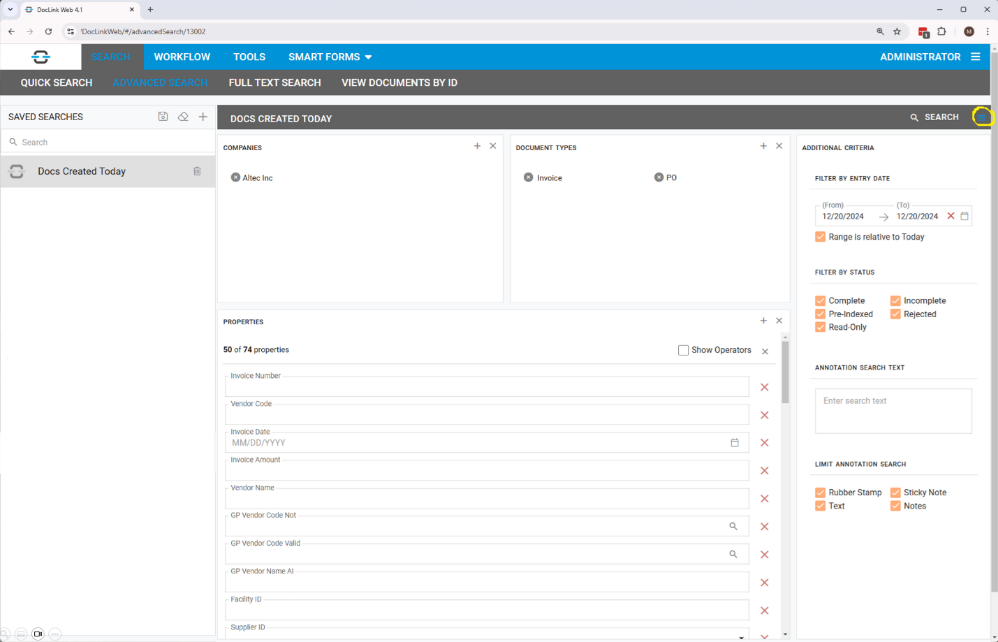
The ‘Additional Criteria’ section is now located in a new slide-out panel. This section was previously found at the bottom of the Advanced Search tab. Press the hamburger button on the right side of the browser to view/hide additional criteria.
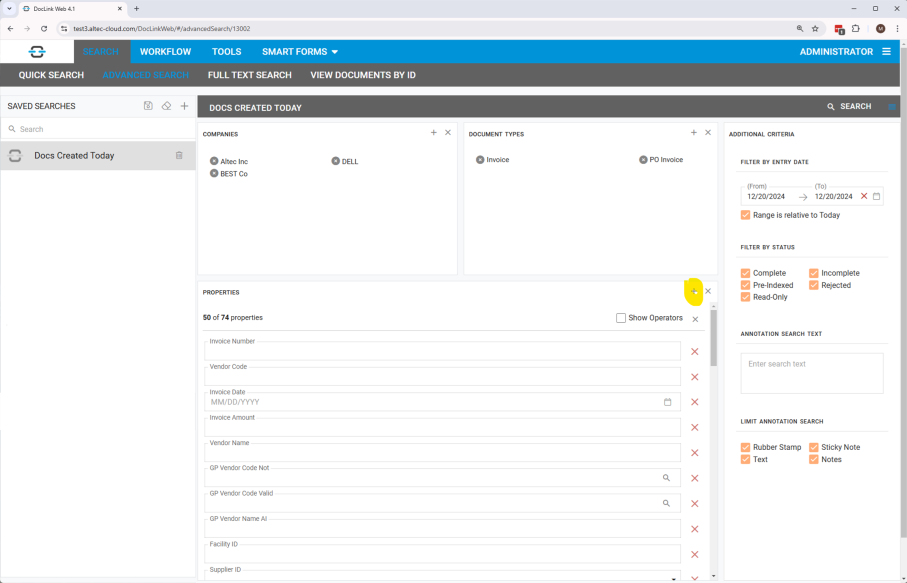
By default, 50 properties are displayed in the Advanced Search window. To add more, press the + button and select the additional properties from the dialog.
Updated Navigation
The menu bar in DocLink Web has been simplified to a single row. When the user hovers over a menu selection, the options appear in a drop-down.

User Creation and Management
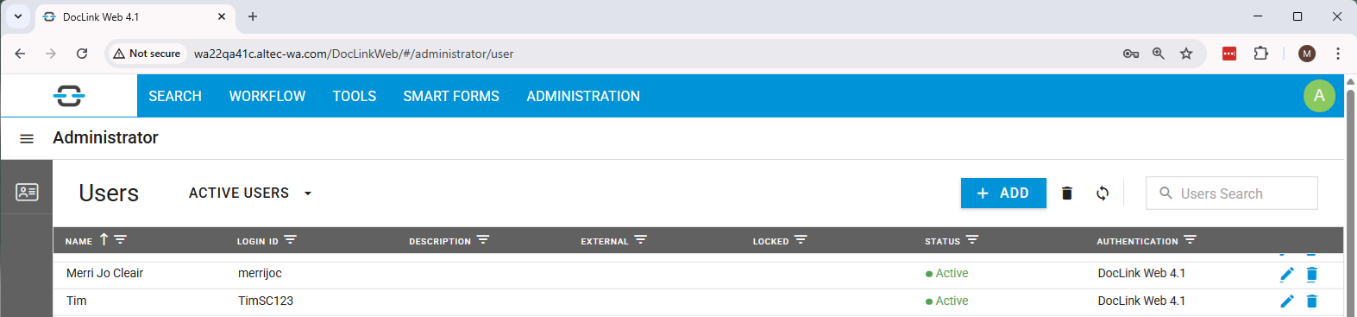
DocLink administrators can now create and manage users from within DocLink Web. Functionality is accessed from the Administration menu option and includes:
- Creation of new users and assignment to one or more roles
- Edit of existing users
- Filtering of user list by active and inactive users
- Search for a specific user
- Sorting the user list by a column in the grid or filtering by the data in that column
Import Manager Enhancements
Support for UBL XML Format
Import Manager has been enhanced to receive and process e-invoice data in UBL XML format.
Doc Creation from XML file in DocLink Cloud
In DocLink Cloud, Import Manager can now consume an XML file and use the values in the XML file to create and index a new PDF document.
PO Matching Enhancement
Line Splitting
A new configurable option has been added to Automated PO Match. This option splits an invoice line into multiple lines to provide a one-to-one relationship with the purchasing/receivings data from the ERP. This new option is available in DocLink Web and DocLink Smart Client.
Support for SAML 2.0
SAML 2.0 for DocLink Web
DocLink Web is now integrated with SAML 2.0, allowing you to authenticate directly against an identity provider. This negates the need to log in to DocLink Web.
This feature is available with the following requirements:
- DocLink Web Client (not supported if using DocLink Smart Client or DocLink Mobile)
- Use of an identity provider (IDP) that supports SAML 2.0
Smart Form Enhancements
Collapsible Ribbon in Smart Client
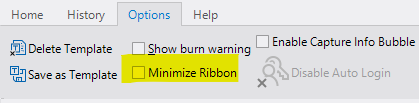
The user can now collapse the Smart Form toolbar ribbon in Smart Client GL Smart Forms to provide additional real estate for Smart Form data.
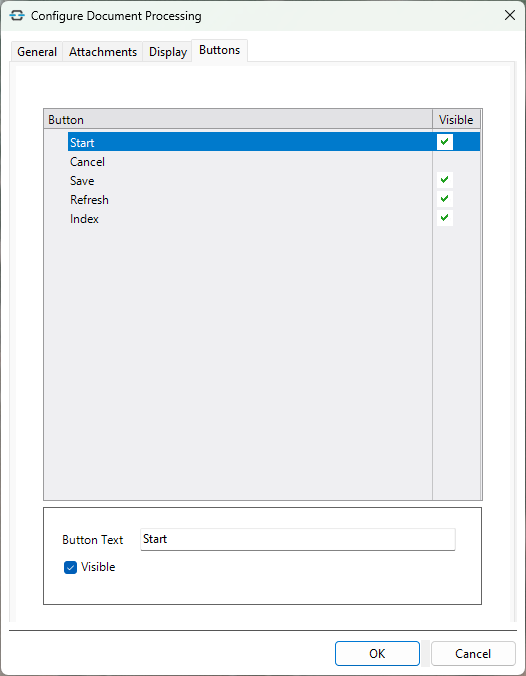
Customisable Toolbar
Because Smart Forms can be used for many different purposes, the ability to customize the toolbar buttons within the context of individual Smart Forms is now available.
The DocLink administrator can edit button labels and can hide unnecessary buttons on the Smart Form toolbar.
Smart Capture Enhancement
Rejected Documents
If a document being sent from Smart Capture to DocLink was missing a required property or had a document type without a corresponding match in the DocLink repository, users didn’t have visibility to the issue.
The DocLink administrator can now create a new ‘rejected’ OCR document type. If a document is imported from Smart Capture into DocLink without a required property or with a document type mismatch, the document will be indexed as the new rejected OCR document type.
In addition, if a property value (that isn’t a required property) is in an incorrect format, the document will be indexed into DocLink without that property value.
Smart Capture Cloud Integration
A new integration between Smart Capture Cloud and DocLink Cloud is now available. The integration utilizes an API to import the data and images into the DocLink repository and does not require installation of an on-premises client for the transfer. Note that no change is necessary for tenants utilizing the previous integration. The previous integration will continue to work.
