Release Notes 2026
September 2026
August 2026
July Release 2026
June Release 2026
May 2026
April 2026
March 2026
February 2026
Frequently Asked Questions!
How do I access field level help?
How do I see descriptions of codes in enquiry screens?
How do I make a user have read only access
Can I copy and delete lines in data entry screens?
Out of Office
Can I run a report to view security groups against my users?
How do I stop a user posting to prior and future periods?
Delete a payment run
Changing security access to a user
User setup requires multiple screens and is complicated!
De-allocate an AP Payment
How to stop over receipting of orders
Why has my transaction not appeared on the AP Payment run?
Download Templates
Useful information to include when raising Financials cases
Prevent users posting to specific balance classes
Hints and Tips!
General Ledger - Helpful how-to guides
General Ledger Data Entry
Journal Upload
Journal Entry, Copy and Authorise
Multi Level Authorisation
Modernisation Budget Upload
General Ledger Enquiries
GL Enquiries - Transaction Enquiries
GL Enquiries - Balance Sheet & Profit and Loss
GL Enquiries - Account Details
Trial Balance
Period and Year End Close
General Ledger Security
Accounts Payable - Helpful how-to guides
Accounts Payable Supplier File
Accounts Payable Data Entry
Log and Invoice/Credit note
Enter a logged Invoice
Enter a non order related Invoice
Order Related Invoice
Order Related Invoices with Mismatches
Order Related Invoice - Mismatch Scenarios
Mismatch Types
Invoice and Credit Note Matching
Accounts Payable Enquiries
Accounts Payable Transaction Maintenance
Accounts Payable Payment Processing
Accounts Payable Code Tables
Accounts Payable Reports
Accounts Receivable - Helpful how-to guides
Customer Maintenance
Enquiries
Cash Allocation
Data Entry & Contracts
Student Sponsor - Education sector
Credit Control
Credit Control Overview
Customer Statements
Diary Notes
Query Management
Interest Charges
Dunning Process
Credit Control Diary
Reporting within Financials
Student Sponsor - Education Sector
Purchasing Management - Helpful how-to guides
Fixed Assets - Helpful how-to guides
Prompt File - Asset Creation
Join Prompt File Items
Fixed Assets Period End & Depreciation
Revaluation
Disposals
Relife
Reconciliation process - Helpful how-to guides
Daily Checks
Accounts Receivable Reconciliation Reporting
Accounts Payable Reconciliation Reporting
Fixed Assets Reconciliation Reporting
General Ledger Reconciliation Reporting
Purchasing Management Reconciliation Reporting
Reporting
General Ledger Reports
Accounts Payable Reports
Accounts Receivable Reports
Sales Invoicing Reports
Fixed Assets Reports
Bank Reconciliation Reports
Import Tool Kit
Procurement Portal
Procurement Portal new User Interface
Navigation
Requisitions
Orders
Authorisation
Receiver
Invoice Clearance
Portal Administration
Procurement Portal - Teams Setup
Invoice Manager
Purchase Invoice Automation (PIA)
February Release notes
March Release Update
January 2026 Release notes
Deleting Supplier training data
Password Reset in Smart-Capture
Adding a New User - Smart Workflow
Resetting password - Smart Workflow
Purchase Invoice Automation
Reprocessing Failed OCR Supplier Invoices
How to Create a New User in Smart-Capture
Smart Capture Email Configuration Overview
Configuring Smart Capture to use Gmail in the Web UI
Configuring Smart Capture to use Microsoft 365 (Graph API) in the Web UI
MAP Configuration Non-Microsoft and Non-Google Accounts
New User Interface
Flow Headstart Forms
Request a nominal
Request a customer
Request a Sales Invoice
Request a management code
Create a Pay Request
Request a Supplier
Bring Your Own BI (BYOBI)
Collaborative Planning
Financial Reporting Consolidation
Air Approvals
Registering Air Approvals
Air Approvals Administration – Create Mobile User
Air Approvals Administration – Reset User’s Activation Key
Reviewing Approvals
Disable/Enable a User
Delete a User
API
Release Notes 2025
December 2025
November 2025
October 2025
September 2025
August 2025
July 2025
June 2025
May 2025
April 2025
March 2025
February 2025
January 2025
Release Notes 2024
December 2024
November 2024
October 2024
September 2024
August 2024
July 2024
June 2024 Release
May 2024
April 2024
March 2024
February 2024
January 2024
Release Notes - Previous years
Contents
- All categories
- Release Notes 2025
- December 2025
December 2025
 Updated
by Caroline Buckland
Updated
by Caroline Buckland
Release Notes
This article contains details of new and amended functionality included in the software update deployed on 15th December 2025.
We've rolled out several enhancements this month, including:
- Jasper Reporting Improvements
- Portal & Invoice Manager Improvements
- Trial Balance Improvements
- ITK updates
Jasper Report Improvements
Details of the change
Financial Reporting Update: GL Account Balance Domain
We're pleased to announce that we've resolved an issue in Financial Reporting affecting the GL Account Balance domain. This domain enables users to generate reports on GL balances using full account keys, individual management and analysis keys, or various path key combinations set up in Financials.
Key Details
What's Changed?
Previously, certain path key combinations were not displayed in reports if a specific management or analysis key was not part of that combination. This limited the flexibility of reports, particularly when users needed to view balances across multiple paths.
Recommended Actions
To ensure a seamless experience, we recommend reviewing your existing reports based on the GL Account Balances domain to determine if they've been impacted. Specifically:
Check reports that don't filter on path, as they may now return more data rows than before.
Consider adding a path filter to these reports to limit the data to only the required paths.
By taking these steps, you can continue to generate accurate and relevant financial reports using the GL Account Balance domain. If you have any questions or concerns, please don't hesitate to reach out.
Portals and Invoice Manager
Details of the change
There have been updates to the procurement portal and Invoice Manager. Read the highlights below.
Key Details
Portals
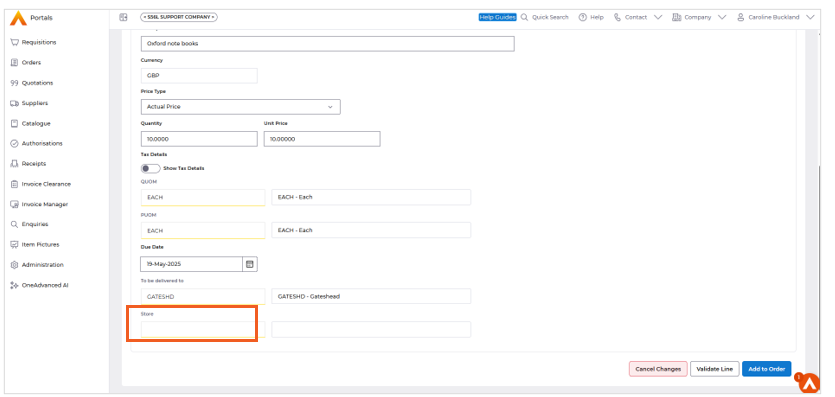
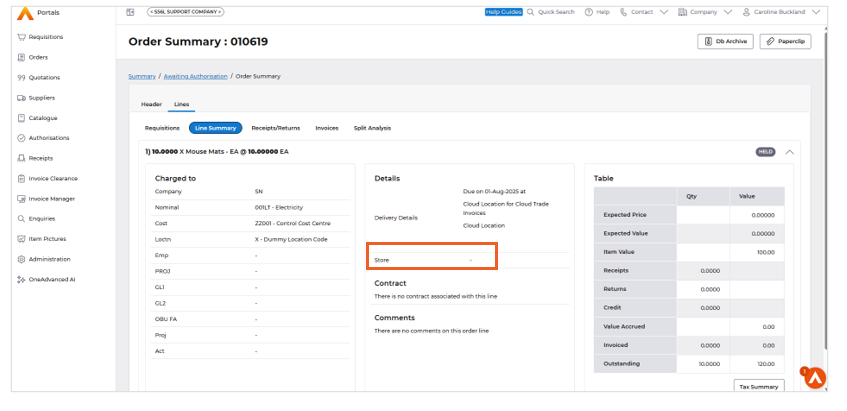
Implemented ‘Store’ field to the Requisition creation and Summary screens in Portals, ensuring consistency with data entry in Core Financials. Only applicable when using Inventory Management.
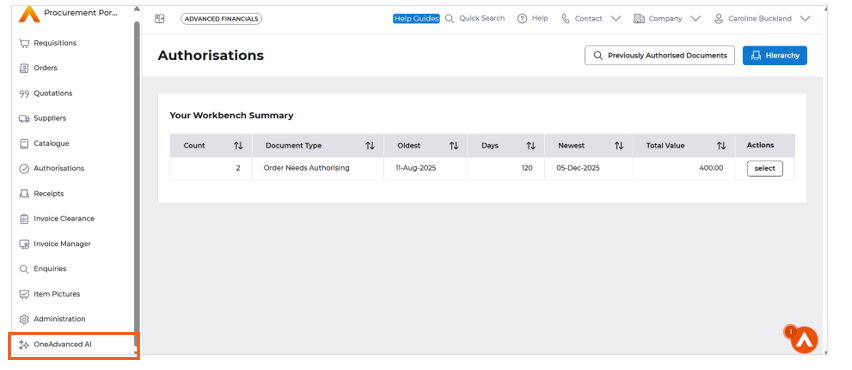
OneAdvanced AI Menu is added to Portals - boosting productivity by streamlining access to insights, automation, and assistance. It also improves security and consistency by ensuring employees use OneAdvanced safe AI features.
Invoice Manager
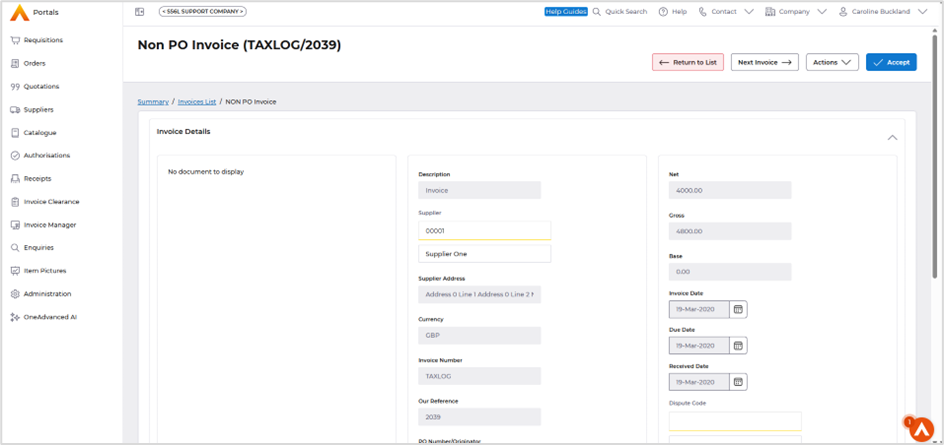
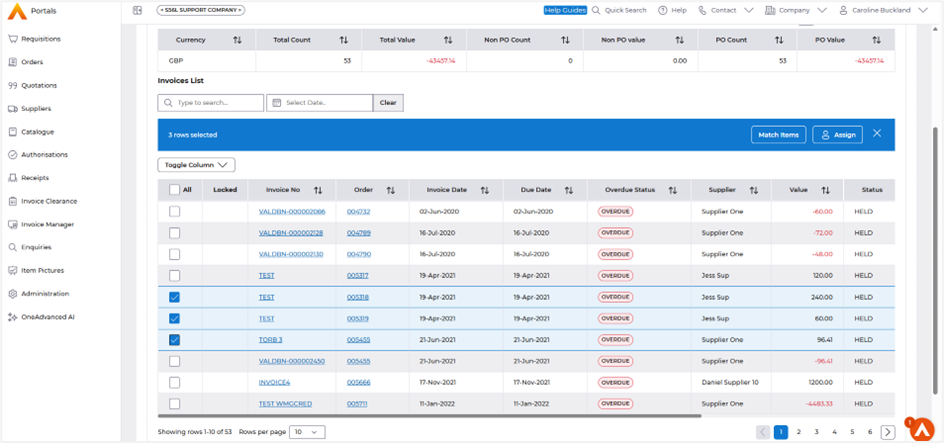
Bulk Amend feature for Logged and Bulk amend Held Transactions.
Portals Store Field
Data Entry
Summary
OneAdvanced AI
Invoice Manager
Bulk Amend
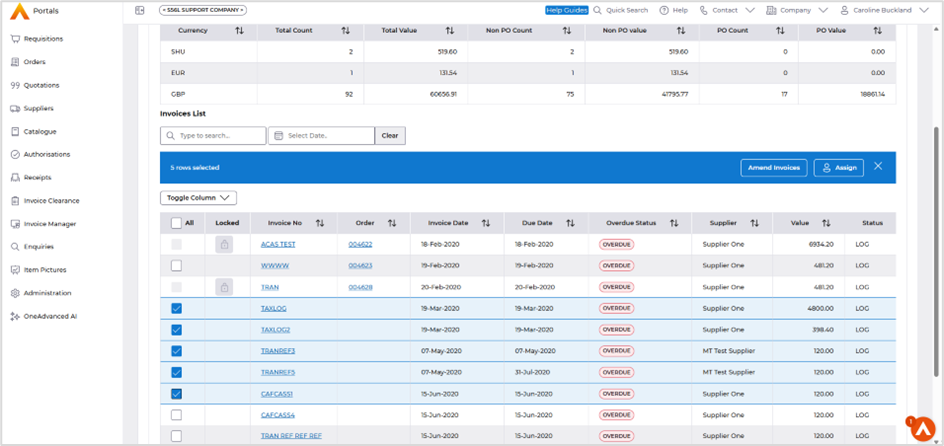
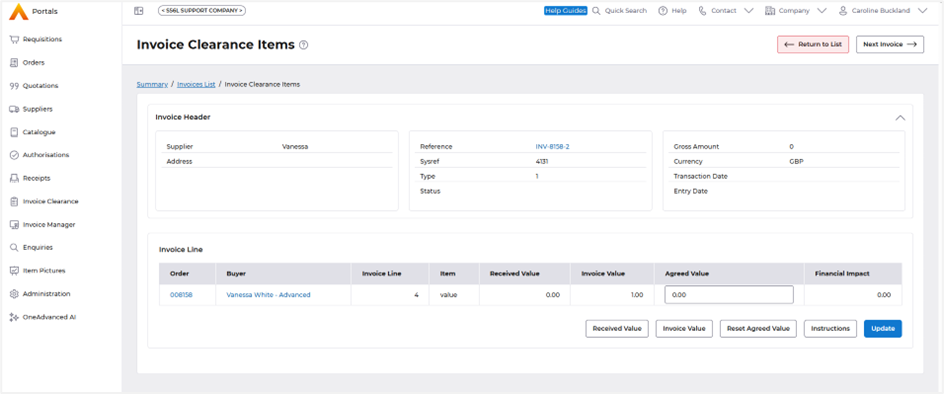
Make your changes and then select the Next Invoice button.
Held Invoices – multi select to allow the Match Item selection.
The Next Invoice action is now available.
Trial Balance
Details of the change
A new version of the trial balance is now available, offering a nominal summary option in addition to the full account view.
Key Details
- The listing of the trial balance is nominal only.
- Current report has menu renamed to Full Account Trial Balance Report
Access the following menus.
General Ledger>GL Enquiries>Nominal Summary Trial Balance Report
Enter the parameters:
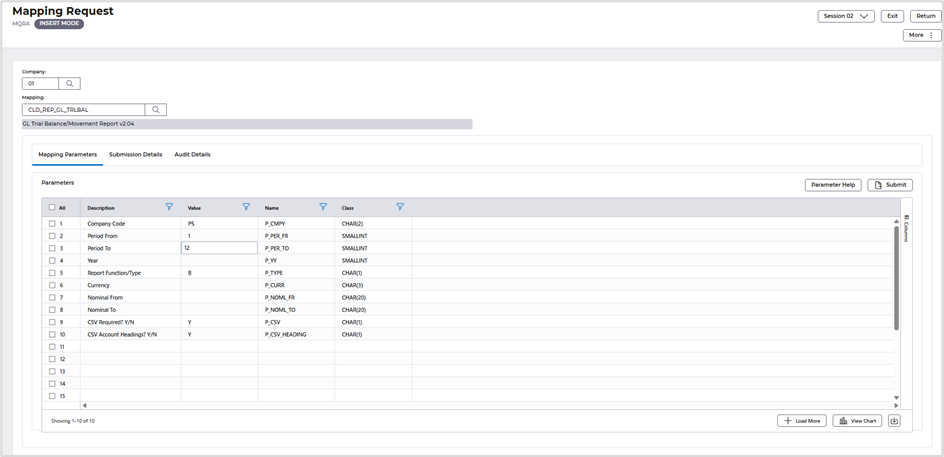
To understand more around the parameters, select the field followed by the Parameter Help button.
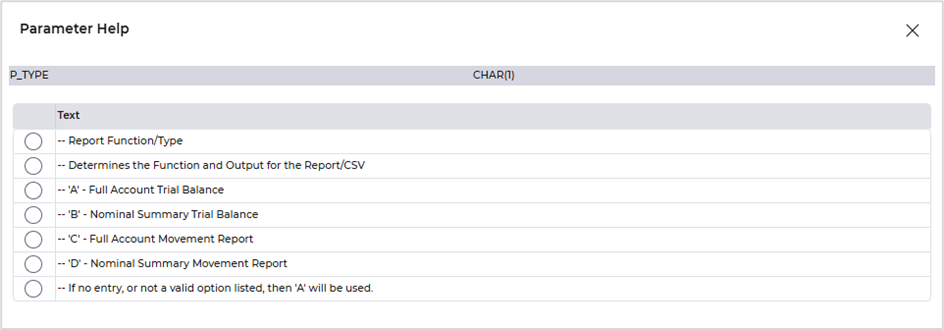
Once complete, select the Submit followed by Submit again.
It can be accessed from Files Management.
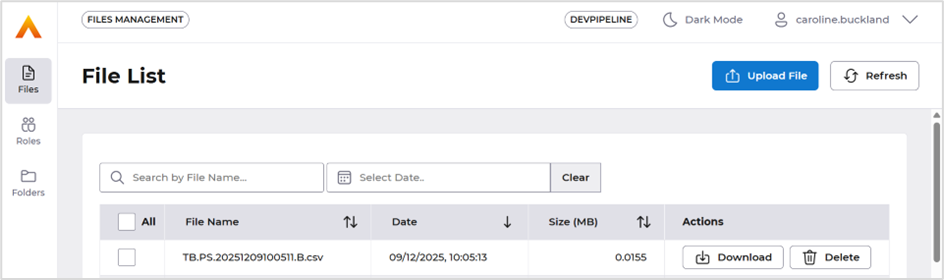
File example.
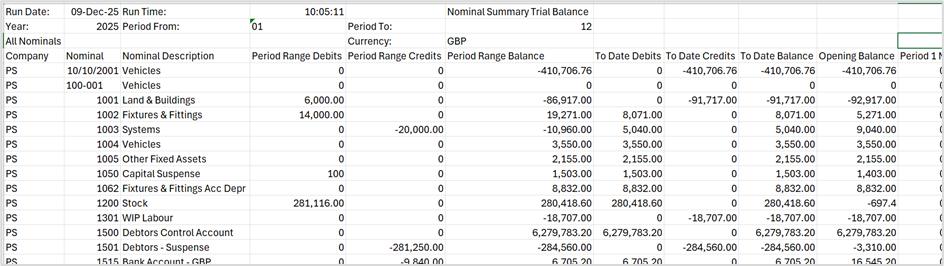
Import tool Kit (ITK) Changes
ITK
New version of the customer ITK load (01BCUST) replacing the need for 4 older ITK's.
The primary resolution is that the ITK now permits amendments to Customers using the ITK for Banks and Addresses. Previously, this process resulted in errors indicating that the Details did not exist
Field Columns Fax and Telex have also been replaced by SMS Mobile and SI Trans mechanism.
The ITK’s are labelled as shown below.
- 01BCONT ADV - AR - Customer Contacts OLD
- 01BCUSTI ADV - AR - Customer - ICA Version OLD
- 01BCUSTS ADV - AR - Customer - Single OLD
- 01BELEM ADV - AR - Customer Add Elements OLD
The NEW ITK has a new template csv (cust.csv)
01BCUST ADV - AR - Customer Load 2.0
All csv formats can be found here.
https://advancedfinancials.helpdocs.io/category/a47nieu4bk-import-tool-kit
Menu changes
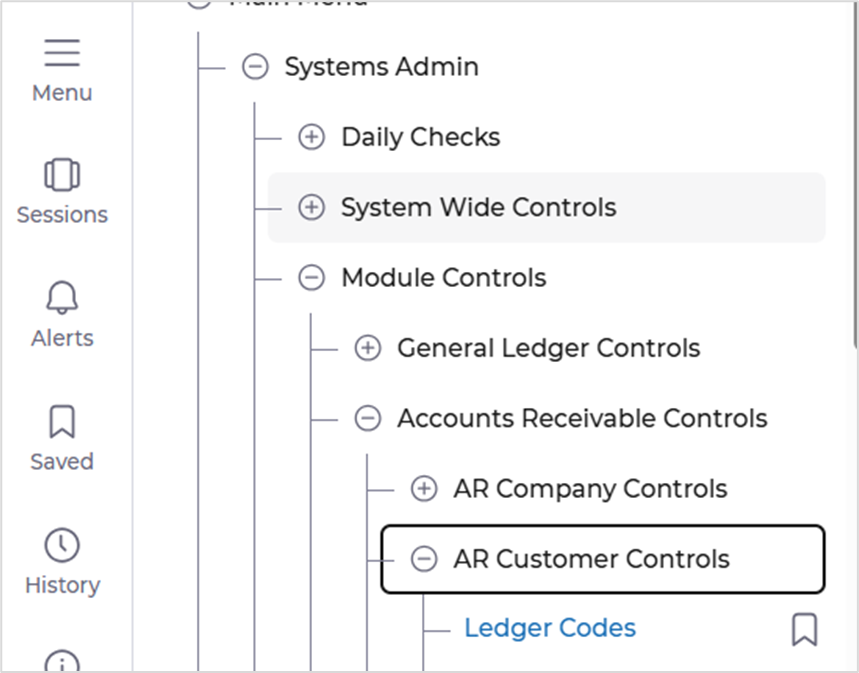
Ledger controls added to CMAIN menu.
Systems Admin>Module Controls>Accounts Receivable Controls>AR Customer Controls>Ledger Controls.
AFX Improvements
Improved Navigation and Data Entry
- We've enabled arrow-key navigation in AFX editable grids, making data entry faster and more efficient, like the experience in E5H5.
Enhanced User Interface
- A new toggle feature has been implemented to control the behaviour of the attachment window in the AFX UI, giving you more flexibility.
Performance Optimizations
- We've optimized the load performance of Enquiry lists to ensure a smoother experience.
- The loading of Exit and Favourite Enquiry dialog boxes has been optimized, resulting in improved performance.
Improved Accessibility
- To enhance accessibility and usability, we've reintroduced key action buttons outside the More button on commonly used AFX screens.
