Release Notes 2026
October 2026
September 2026
August 2026
July Release 2026
June Release 2026
May 2026
April 2026
March 2026
February 2026
Frequently Asked Questions!
How do I access field level help?
How do I see descriptions of codes in enquiry screens?
How do I make a user have read only access
Can I copy and delete lines in data entry screens?
Out of Office
Can I run a report to view security groups against my users?
How do I stop a user posting to prior and future periods?
Delete a payment run
Changing security access to a user
User setup requires multiple screens and is complicated!
De-allocate an AP Payment
How to stop over receipting of orders
Why has my transaction not appeared on the AP Payment run?
Download Templates
Useful information to include when raising Financials cases
Prevent users posting to specific balance classes
Hints and Tips!
General Ledger - Helpful how-to guides
General Ledger Data Entry
Journal Upload
Journal Entry, Copy and Authorise
Multi Level Authorisation
Modernisation Budget Upload
General Ledger Enquiries
GL Enquiries - Transaction Enquiries
GL Enquiries - Balance Sheet & Profit and Loss
GL Enquiries - Account Details
Trial Balance
Period and Year End Close
General Ledger Security
Accounts Payable - Helpful how-to guides
Accounts Payable Supplier File
Accounts Payable Data Entry
Log and Invoice/Credit note
Enter a logged Invoice
Enter a non order related Invoice
Order Related Invoice
Order Related Invoices with Mismatches
Order Related Invoice - Mismatch Scenarios
Mismatch Types
Invoice and Credit Note Matching
Accounts Payable Enquiries
Accounts Payable Transaction Maintenance
Accounts Payable Payment Processing
Accounts Payable Code Tables
Accounts Payable Reports
Accounts Receivable - Helpful how-to guides
Customer Maintenance
Enquiries
Cash Allocation
Data Entry & Contracts
Student Sponsor - Education sector
Credit Control
Credit Control Overview
Customer Statements
Diary Notes
Query Management
Interest Charges
Dunning Process
Credit Control Diary
Reporting within Financials
Student Sponsor - Education Sector
Purchasing Management - Helpful how-to guides
Fixed Assets - Helpful how-to guides
Prompt File - Asset Creation
Join Prompt File Items
Fixed Assets Period End & Depreciation
Revaluation
Disposals
Relife
Reconciliation process - Helpful how-to guides
Daily Checks
Accounts Receivable Reconciliation Reporting
Accounts Payable Reconciliation Reporting
Fixed Assets Reconciliation Reporting
General Ledger Reconciliation Reporting
Purchasing Management Reconciliation Reporting
Reporting
General Ledger Reports
Accounts Payable Reports
Accounts Receivable Reports
Sales Invoicing Reports
Fixed Assets Reports
Bank Reconciliation Reports
Import Tool Kit
Procurement Portal
Procurement Portal new User Interface
Navigation
Requisitions
Orders
Authorisation
Receiver
Invoice Clearance
Portal Administration
Procurement Portal - Teams Setup
Invoice Manager
Purchase Invoice Automation (PIA)
February Release notes
March Release Update
January 2026 Release notes
Deleting Supplier training data
Password Reset in Smart-Capture
Adding a New User - Smart Workflow
Resetting password - Smart Workflow
Purchase Invoice Automation
Reprocessing Failed OCR Supplier Invoices
How to Create a New User in Smart-Capture
Smart Capture Email Configuration Overview
Configuring Smart Capture to use Gmail in the Web UI
Configuring Smart Capture to use Microsoft 365 (Graph API) in the Web UI
MAP Configuration Non-Microsoft and Non-Google Accounts
New User Interface
Flow Headstart Forms
Request a nominal
Request a customer
Request a Sales Invoice
Request a management code
Create a Pay Request
Request a Supplier
Bring Your Own BI (BYOBI)
Collaborative Planning
Financial Reporting Consolidation
Air Approvals
Registering Air Approvals
Air Approvals Administration – Create Mobile User
Air Approvals Administration – Reset User’s Activation Key
Reviewing Approvals
Disable/Enable a User
Delete a User
API
Release Notes 2025
December 2025
November 2025
October 2025
September 2025
August 2025
July 2025
June 2025
May 2025
April 2025
March 2025
February 2025
January 2025
Release Notes 2024
December 2024
November 2024
October 2024
September 2024
August 2024
July 2024
June 2024 Release
May 2024
April 2024
March 2024
February 2024
January 2024
Release Notes - Previous years
Contents
- All categories
- Release Notes 2026
- August 2026
August 2026
 Updated
by Caroline Buckland
Updated
by Caroline Buckland
Release Notes
This article contains details of new and amended functionality included in the software update deployed on 10th August 2026. We've rolled out several enhancements this month, including:
- Procurement Portal - Download data to Excel
- Procurement Portal - See rejection details on orders and requisitions
- Procurement Portal - More helpful error messages
- Procurement Portal - Easier actions menu
- AFX Updates
- Fixes
Download data to Excel
Details of the change
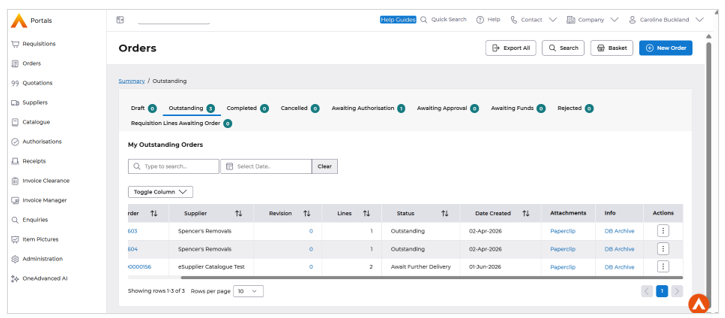
The Procurement Portal now offers improved export capabilities, allowing users to easily download lists from various screens, including orders, requisitions, quotations, invoices, authorisations, receipts, enquiries, catalogue, and suppliers, directly to an Excel file.
A key enhancement is that the export feature honours the quick filters applied on the Order/Requisition Search, Quotation Search, and Standard Catalogue screens, ensuring that the exported data accurately reflects the filtered results.
See rejection details on orders and requisitions
Details of the change
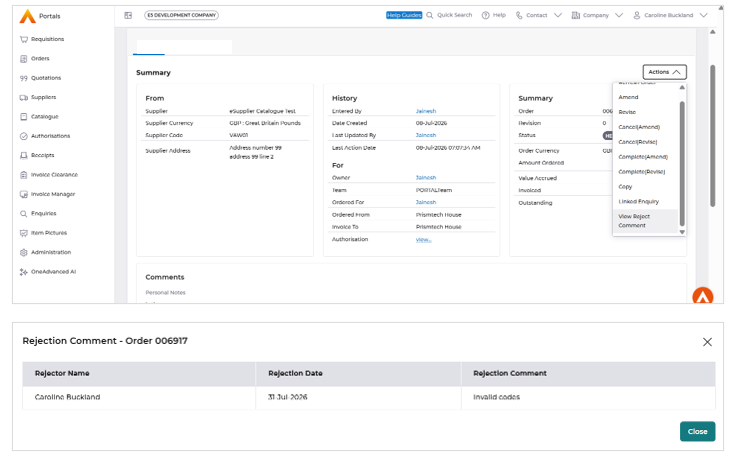
A new "View Reject Comment" feature provides greater transparency by displaying the details of a rejected document, including the person who rejected it, the reason for rejection, and the date. This information is conveniently available on both the summary screen and in a pop-up.
Furthermore, the rejection comment remains visible even after the document has been amended or revised, ensuring that users can easily reference the original feedback.
More helpful error messages
Details of the change
The Procurement Portal now provides more informative error messages, replacing generic technical errors with clearer information. This enables users to better understand the issue.
Easier Actions menu
Details of the change
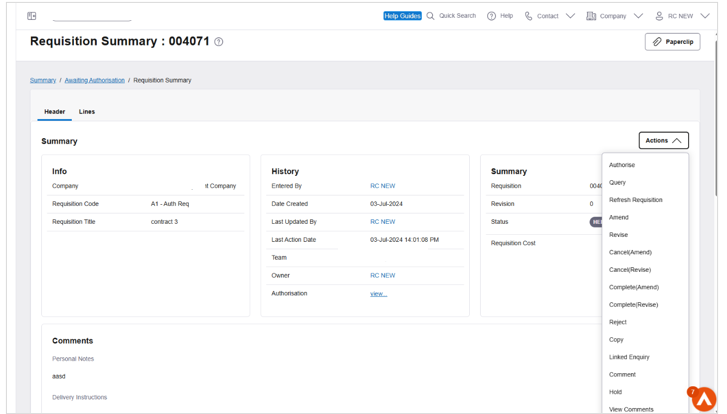
To enhance the user experience, a scrollbar has been introduced to the Actions drop-down menu on both Order and Requisition screens. This improvement makes it easier to navigate lengthy menus, allowing users to quickly access the actions they need.
AFX Updates
- Fixed an accessibility issue by associating the missing label with the hidden input element in the Supplier List screen, improving screen reader compatibility and compliance with accessibility standards.
- Enhanced accessibility by ensuring keyboard users can access and operate the calculator, including the ability to remove calculator focus using standard keyboard interactions.
- Improved accessibility by making the bookmark functionality fully operable using the keyboard and providing appropriate accessibility support for keyboard-only users.
- Updated the close button to include a clear and descriptive accessible name, enabling assistive technologies to accurately identify its purpose.
- Improved the Fast Prompt – Supplier Category screen by updating the label text to more clearly describe its associated purpose, enhancing usability and accessibility.
- Fixed an issue where the Fast Print Update Exe button in the MMFB Change Calculator was incorrectly disabled after payment processing, restoring the expected functionality.
- Resolved an issue causing AFX Favourite Enquiries to fail to load, restoring normal application functionality.
- Fixed the MBLA Transfer dialog box functionality in AFX by resolving issues that prevented proper operation and ensuring error messages are displayed correctly instead of being hidden.
- Implemented support for the JavaBean EXE button type in AFX, enabling the expected execution behaviour for JavaBean-based actions.
Financial and back-office corrections
- Overnight funds-checking resubmission — the DZ2 batch process that re-submits failed funds-checking transactions has been reinstated in the daily
- Goods-receipt commitment clearing — fixed a calculation issue were doing a quantity clearance followed by a price clearance on a purchase order left small residual balances and unbalanced postings
- Returns for non-default companies — users can now process returns in the portal when working in a company other than their default company; previously this failed because the portal was incorrectly using the default company security settings
Bug fixes in the Procurement Portal
- Authorising an order line from the list screen no longer gives a “parameter too large” error
- Uploading a file no longer briefly shows a false “error while deleting file” message before the success message appears
- The reject reason on the requisition summary screen is now limited to 254 characters, matching the authorisation list screen
- The date picker quick-search on the “Invoices to clear” screen works again
- The Price column on “Requisition Lines Awaiting Orders” now shows values with comma separators and sorts correctly
- The “Orders Requiring Receipt” search results screen displays correctly
- When amending an invoice, the history log is now reflected in the Notes text area
