Contents
June Release 2026
 Updated
by Caroline Buckland
Updated
by Caroline Buckland
Release Notes - deferred to July
This document contains details of new and amended functionality included in the software update deployed on 15th June 2026. We've rolled out several enhancements this month, including:
- Portal Changes
o Commitment Date & Expected Date added
o Authorisation navigation improvements
o Comments on orders via approval
o Commitment popup window for requestor
o Multi Line Return
o Pause BEM Mismatches
- AFX Changes
Procurement Portal Changes
Commitment and Expected date added
Details of the change
When raising purchase orders in Financials Core, you're able to enter key dates such as commitment date, due date, and expected date. The commitment date is often used to indicate when goods are expected to be received, or a service is due to be completed.
This useful feature has now been extended to the Procurement Portals, providing a more consistent and streamlined experience across both products.
To use this functionality, access the Administration Menu followed by the Purchasing Tile.
The Expected date and Commitment date can be toggled on.
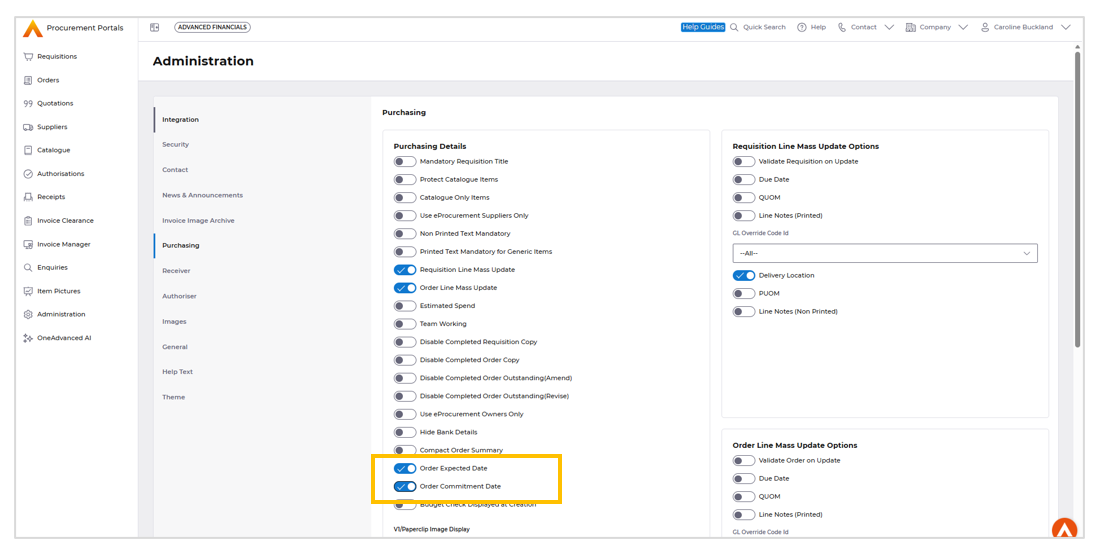
Save the change.
During Data entry the new fields are displayed at line level.
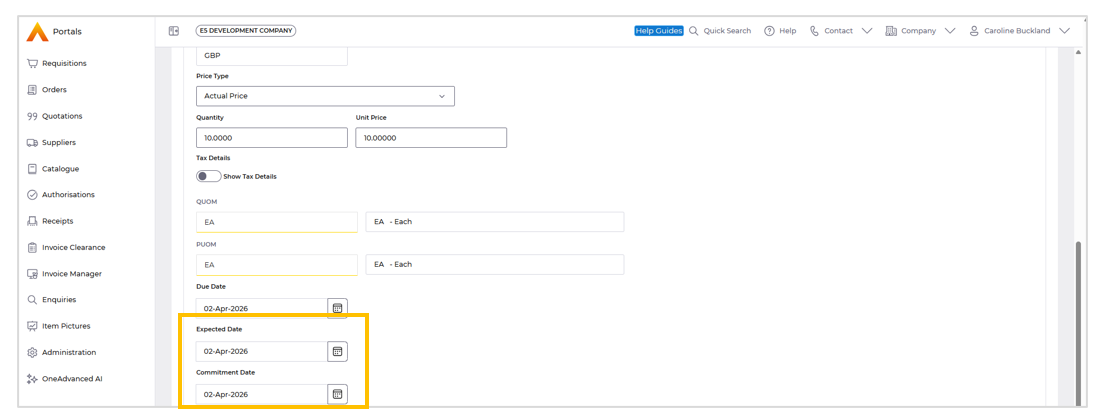
Authorisation navigation improvements
Details of the change
When authorising orders or invoices, you can now expect a more streamlined experience. Previously, selecting 'Orders to authorise' from the workbench would display a list of orders. After authorising an order, you would be taken back to the initial list.
This process has been enhanced. Now, after authorising a document, you will be returned to the specific list of unauthorised documents you were working with, making it easier to continue with your tasks.
This functionality also applies to Proxy Authorisation when using the Hierarchy button.
Improved Comments and Hold Features during approval
Details of the change
We've enhanced the authorisation workflow to make it more efficient. Previously, when authorising an order, users had to exit the authorisation screen to add notes or put the order on hold.
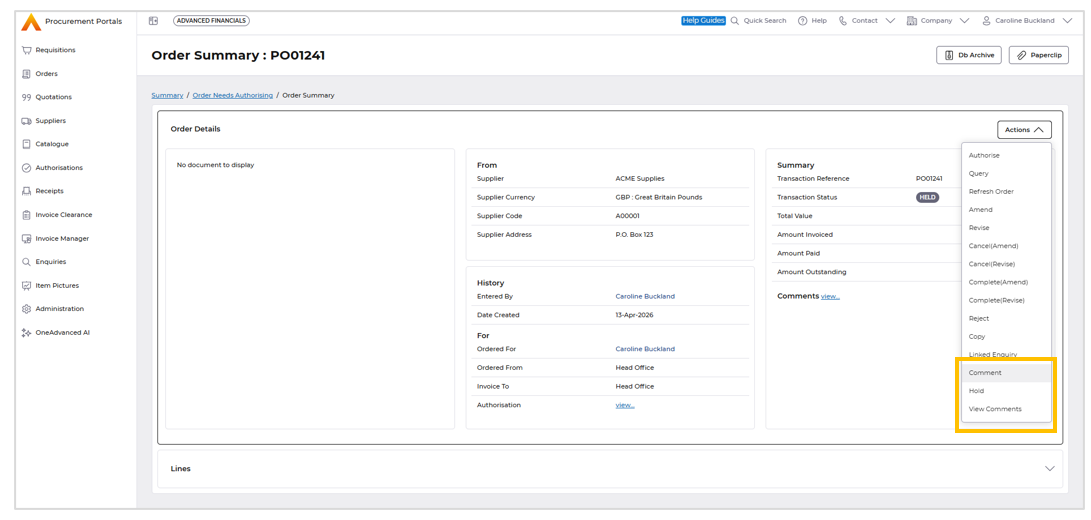
Now, after selecting 'Authorise', you can seamlessly:
- Add comments to provide additional context
- View existing comments to review previous notes
- Put the order on hold for further authorisation
This new functionality eliminates the need to navigate away from the authorisation screen, saving time and improving the overall user experience.
Commitment balance popup shown to requestor
Details of the change
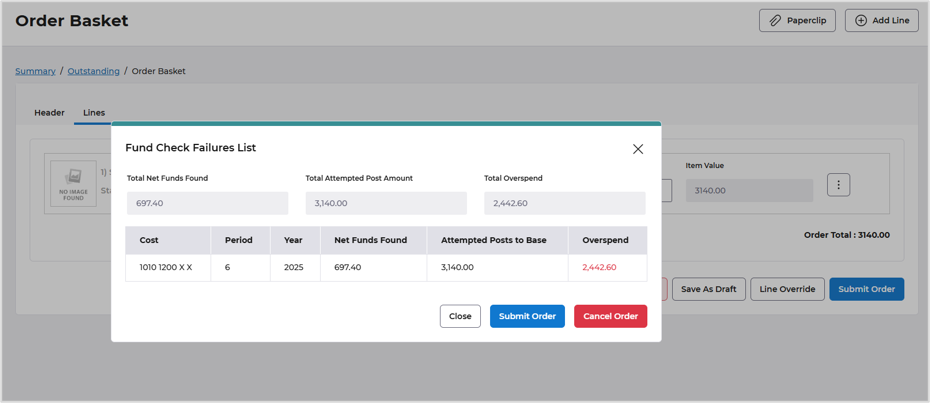
We recently enhanced our procurement portal by introducing funds checking messages for approvers. This functionality has now been extended to order creators, providing a more streamlined and transparent process.
When creating an order that exceeds the allocated budget, the requestor will now receive a clear warning message, accompanied by a popup that highlights the extent of the overspend. This update enables requestors to review and adjust their orders accordingly, ensuring better budget management and compliance
For more information see the link below:
August 2025 - Help | Financials
New message on Order submission screen.
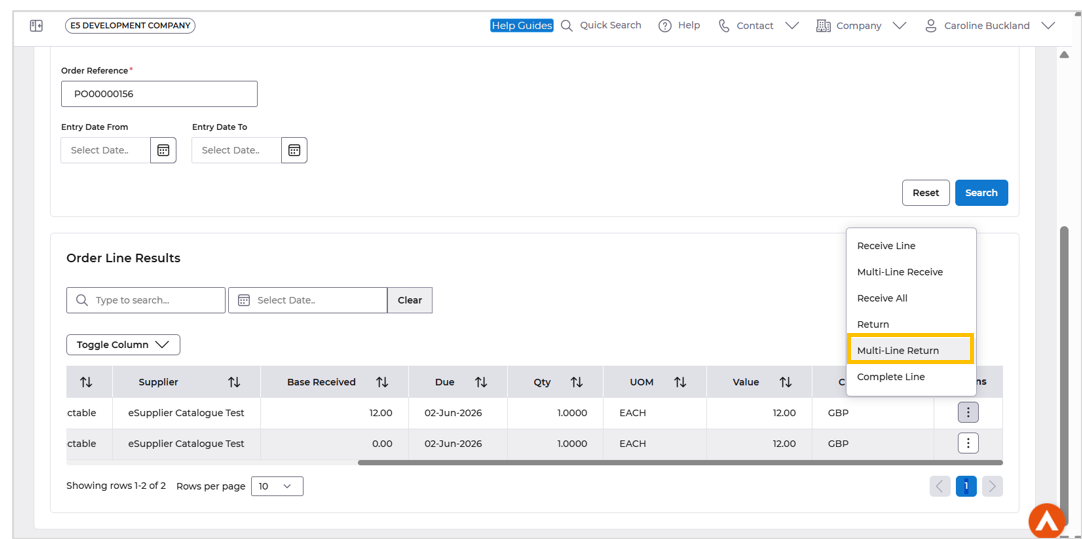
Multi Line Return
Details of the change
The Procurement Portal now supports multi-line returns, enhancing user experience and functionality. This feature, previously available in Core Financials, has been successfully extended to the Portals, providing a more streamlined and efficient process.
Pause quantity/value mismatch notification for a period of days
Details of the change
We have introduced an improvement to our procurement process mismatch flow. A new setting in Accounts Payable Company Controls allows a delay in the workflow message being sent to end users, to chase up missing receipts. If set, any mismatch notifications for quantity and value discrepancies will no longer be sent out immediately and will until the BEM hold days flag has passed.
To set the number of wait days, select the menus below:
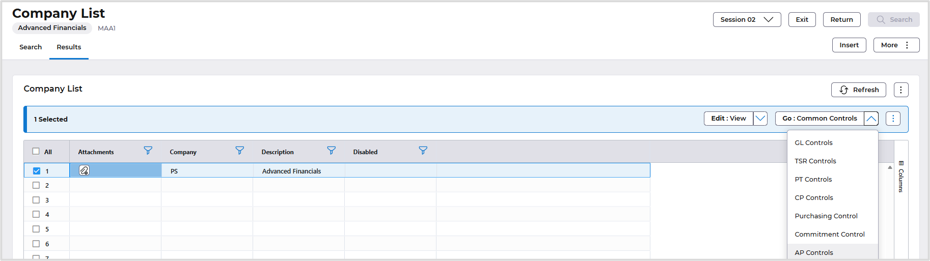
Systems Admin>Combined Company Controls
Locate your company and select Go>AP Controls
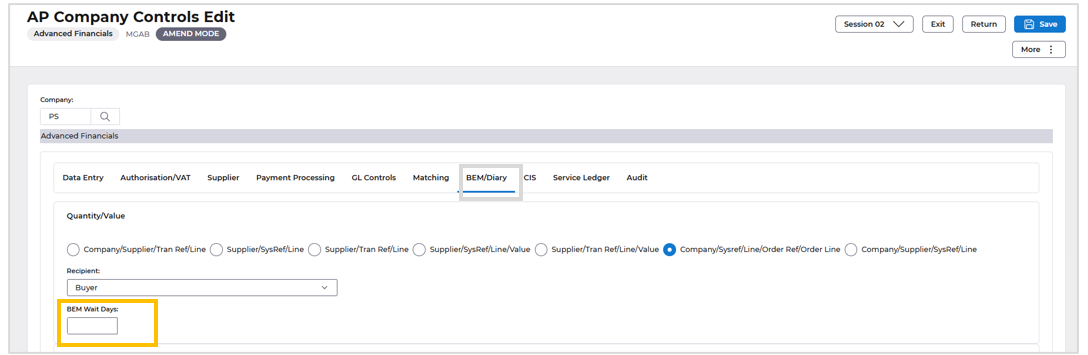
Use the Amend action and then select the BEM/Diary format.
Enter the number of BEM days in the BEM Wait Days field.
Save the change.
There is a new process that can ran overnight to then produce the delayed Business Event (BEM) please raise a support case if you wish to utilise this new functionality.
AFX Changes
Details of the change
- Fixed MCPX Person/Student transaction enquiries screen validation issues to prevent incorrect CPX10 error messages and ensure Favourite Enquiry functionality works as expected.
- Enhanced keyboard accessibility by enabling rail items to open drawers and update content using both Enter and Space keys.
- Resolved AG Grid selection persistence issues in Bank reconciliation screen, ensuring selected transactions remain retained during scrolling.
- Restored the AR Status column in the SI Document List screen to maintain feature parity with E5H5.
- Improved Quick Data Entry usability by automatically hiding empty horizontal tabs to streamline navigation.
- Fixed AR Cash Allocation (MBLA) scrolling issues to retain selected transactions and allocation values.
- Implemented thousand separator formatting enhancements across AP and AR screens to improve readability and consistency for numeric values in both grid and non-grid fields, including support for decimal and negative values.
- Resolved initial load issue in MEBD screen where the “Load More” button was not functioning until a manual refresh.
- Fixed issue where Company Summary search restrictions were not applied correctly when using Fast Prompt retrieval in Fixed Assets.
